
Lighting Models
All In 1 Shader Nodes provides a comprehensive, modular lighting system that gives you complete control over how your materials respond to light. Instead of being locked into a single lighting approach, you can mix and match different lighting components to achieve your desired look.
How It Works
Section titled “How It Works”The lighting system is built around specialized nodes that handle different aspects of light calculation:
- Diffuse Models (Classic, Half Lambert, Toon, Toon Ramp, Fake GI): calculate how surfaces respond to direct light.
- Specular Models (Classic, Toon, Aniso): calculate glossy highlights from the light source.
- Reflections and Reflections Toon: handle environment reflections.
- Ambient Color: the ambient and indirect lighting contribution.
- AO Map: an occlusion texture that darkens the indirect contribution.
Each of these nodes can be used standalone for specific lighting effects, or combined together using the Full Light Model node.
Standalone Usage
Section titled “Standalone Usage”Use individual lighting nodes when you need specific lighting calculations:
Diffuse - Toon -> multiply with your color -> Base Color outputThat gives you just the diffuse lighting result, perfect for simple effects or when you’re handling other lighting components separately. Every Diffuse and Specular node needs the world space Normal, and the Specular and Reflections nodes also need the world space View Direction.
Combined Usage with Full Light Model
Section titled “Combined Usage with Full Light Model”The Full Light Model node acts as a central hub that merges all lighting components together. It takes six inputs:
| Input | What to plug in |
|---|---|
| Object Color | Your albedo, the color everything else is tinted by |
| Diffuse | The output of a Diffuse Model node |
| Specular | The output of a Specular Model node |
| Reflections | The output of Reflections or Reflections Toon |
| Ambient | The output of Ambient Color |
| AO | The output of AO Map |
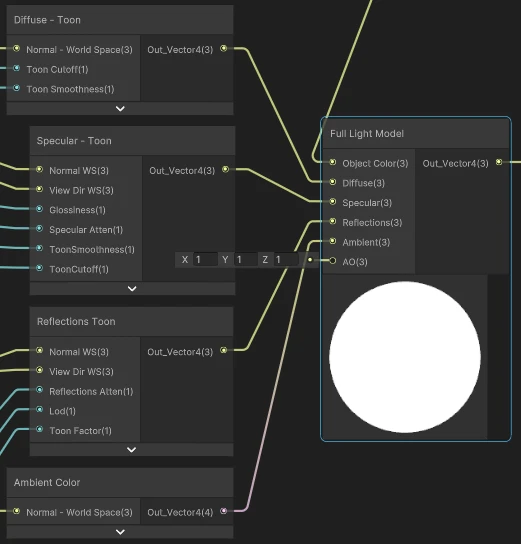
Any input you leave unconnected falls back to a neutral default, so a graph that only wires Object Color and Diffuse is perfectly valid. Object Color tints the diffuse, ambient and reflection terms, specular is added on top of them, and AO attenuates the indirect part.
Benefits of This Approach
Section titled “Benefits of This Approach”Flexibility: Use as much or as little lighting as you need. Simple effects use one node, complex materials combine them all.
Mix and Match: Combine different lighting models for unique looks, like Toon diffuse with Classic specular, or Classic diffuse with Toon reflections.
Modular Control: Adjust each lighting component independently without affecting the others.
Performance: Only the lighting nodes you use cost performance, unused calculations don’t run.
Example
Section titled “Example”See the GRPH_Demo_ChomperToon graph in the demo (Assets\Plugins\AllIn1Assets\AllIn1ShaderNodes\Demo\Graphs) for a complete example of a toon-shaded character using this lighting system.
In this example, the shader uses:
- Diffuse - Toon for cel-shaded lighting
- Specular - Toon for hard-edged highlights
- Reflections Toon for stylized environment reflections
- Ambient Color for fill lighting
All combined through the Full Light Model to create a cohesive toon-shaded look.