
URP Shader Feature Configuration
The URP Shader Feature Configuration panel optimizes shader compilation times and editor performance by letting you enable or disable individual shader features. Disable any features your project doesn’t use to significantly reduce build times. This tool is URP-specific and ships with nine of the fifteen features enabled. The six that are off by default are the specialised ones: Entities Graphics Instancing, Reflection Probes Blending, Light Layers, Decals, Light Cookies and LOD Cross Fade. If you need one of them, enable it and consider turning off something you are not using, to keep compile times down.
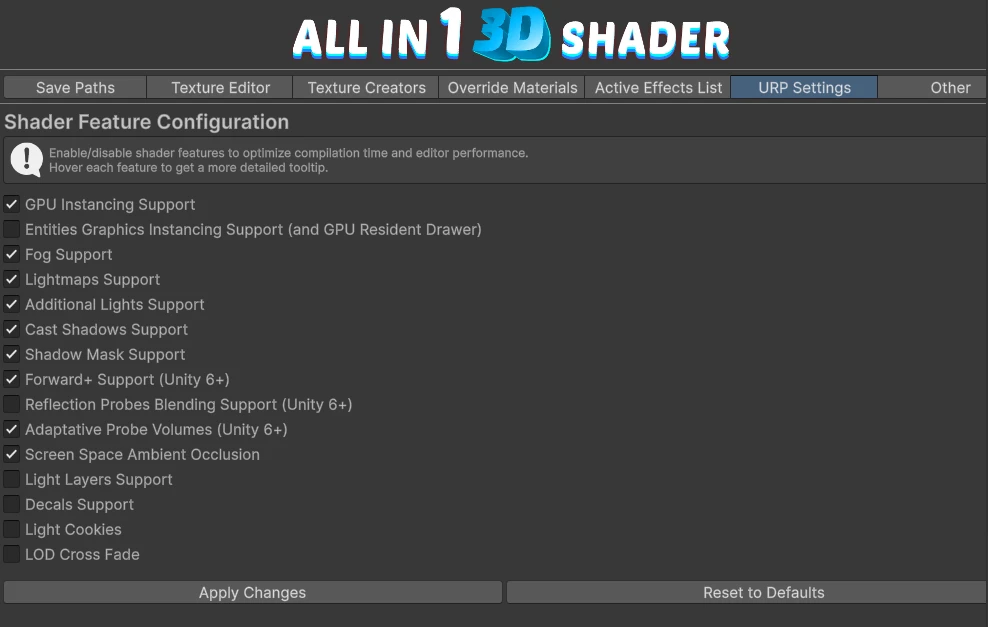
Accessing the Configuration Panel
Section titled “Accessing the Configuration Panel”- Open the AllIn1 3D Shader Window via Tools → AllIn1 → 3D Shader Window
- Navigate to the URP Settings tab
- Scroll to the Shader Feature Configuration section

Using the Feature Configuration
Section titled “Using the Feature Configuration”Basic Usage
Section titled “Basic Usage”Each shader feature is represented by a toggle with a descriptive name. Simply check or uncheck features based on your project’s needs:
- Checked = Feature enabled (adds #define to shader)
- Unchecked = Feature disabled (comments out #define)
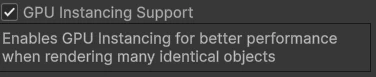
Hover over any feature name to see a detailed tooltip.
Applying Changes
Section titled “Applying Changes”After adjusting your feature selection:
- Click Apply Changes to write the configuration to your shader files
- Unity will automatically recompile affected shaders
- Check the Console for confirmation: “Shader feature configuration applied successfully!”
Reset to Defaults
Section titled “Reset to Defaults”The Reset to Defaults button restores the shipped configuration:
- On: GPU Instancing, Fog, Lightmaps, Additional Lights, Cast Shadows, Shadow Mask, Forward+ (Unity 6+), Adaptative Probe Volumes (Unity 6+), Screen Space Ambient Occlusion
- Off: Entities Graphics Instancing, Reflection Probes Blending (Unity 6+), Light Layers, Decals, Light Cookies, LOD Cross Fade
Feature Reference
Section titled “Feature Reference”Fifteen features, named here exactly as the panel shows them.
Core rendering
Section titled “Core rendering”- GPU Instancing Support - Efficient rendering of many identical objects.
- Entities Graphics Instancing Support (and GPU Resident Drawer) - Instancing for DOTS and ECS projects.
- Fog Support - Unity’s built-in fog.
- LOD Cross Fade - Interpolates between LOD levels instead of popping.
Lighting and shadows
Section titled “Lighting and shadows”- Lightmaps Support - Baked lighting from lightmaps.
- Additional Lights Support - Real-time lights beyond the main directional one.
- Cast Shadows Support - Lets materials cast shadows.
- Shadow Mask Support - Mixed lighting with shadowmask baking.
- Light Layers Support - Selective lighting through Unity’s light layers.
- Light Cookies - Cookie textures on lights.
Unity 6 and newer
Section titled “Unity 6 and newer”- Forward+ Support (Unity 6+) - The Forward+ path, better with many lights.
- Reflection Probes Blending Support (Unity 6+) - Blending between reflection probes.
- Adaptative Probe Volumes (Unity 6+) - Automatically placed light probe groups.
Screen space
Section titled “Screen space”- Screen Space Ambient Occlusion - URP’s SSAO.
- Decals Support - Lets materials receive decals from decal projectors. This is the toggle Decals asks you to turn on, and decals do not work without it.