
Basic Usage
Most spring animations need no code at all. Here is the shortest path from an imported package to something moving.
1. Add a Spring Component
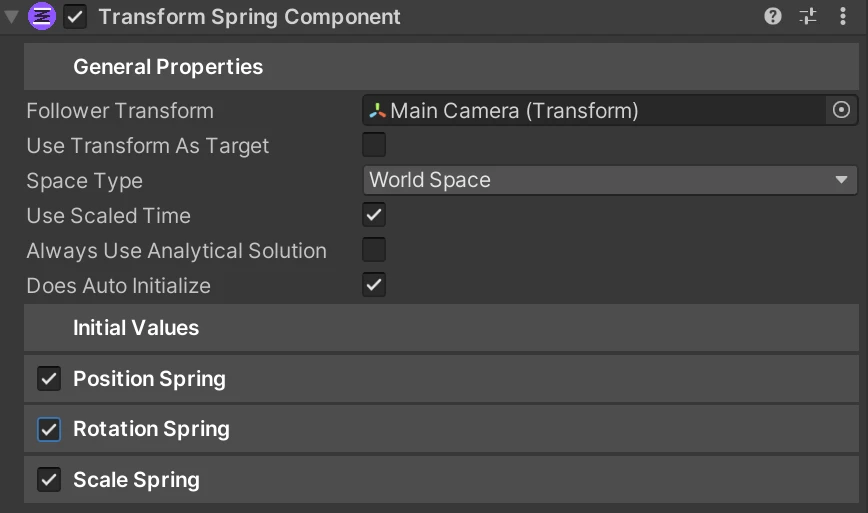
Section titled “1. Add a Spring Component”Pick the component for the thing you want to animate and add it to the GameObject. TransformSpringComponent covers position, rotation and scale, and is where almost everyone starts. The full list is on Spring Components.
2. Set Force and Drag
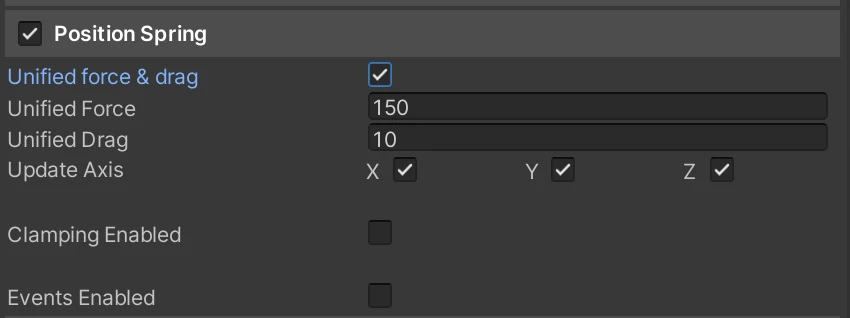
Section titled “2. Set Force and Drag”Force is how hard the spring pulls, Drag is how much it resists moving. A new spring starts at Force 150 and Drag 10, which is a reasonable feel for most things. Higher Force reacts faster, higher Drag bounces less. Details on Spring Main Elements.
3. Decide who sets the target
Section titled “3. Decide who sets the target”Components that follow something in the scene can do it on their own. On TransformSpringComponent, tick Use Transform As Target, drop a transform into Target Transform, and the component tracks it every frame. Nothing else to write.
Leave it unticked and the target is yours to set. Most components have an equivalent option in their General Properties. A few, like FloatSpringComponent, have nothing to follow and are always driven from code.
4. Drive it from a script
Section titled “4. Drive it from a script”Reference the component and call it. The types live in the AllIn1Assets.AllIn1SpringsToolkit namespace:
using UnityEngine;using AllIn1Assets.AllIn1SpringsToolkit;
public class Chest : MonoBehaviour{    [SerializeField] private TransformSpringComponent spring;
    public void Open()    {        // Snap the scale up, let the spring carry it back. One line, one pop.        spring.SetCurrentValueScale(Vector3.one * 1.25f);
        // And tip the lid back.        spring.SetTargetRotation(new Vector3(-70f, 0f, 0f));    }
    public void Close()    {        spring.SetTargetRotation(Vector3.zero);    }}
Nothing there tracks whether the chest is mid-animation, and nothing needs stopping before it starts. Call Open twice in a row and the second call shoves an already-moving spring, which is exactly what it should look like.
If your own scripts sit inside an Assembly Definition, add a reference to AllIn1SpringsToolkitAssembly or the types will not resolve.
Where to go next
Section titled “Where to go next”- Nudges and Punches for the one-line calls that produce most of the game feel
- API Reference for every method on every component
- The demo scene, where every prefab has its controller script on the parent object and is worth reading