
Spring Events
Springs can tell you what they are doing instead of making you poll them. Tick Enable Events on a spring in the Inspector and three C# events become available on it.
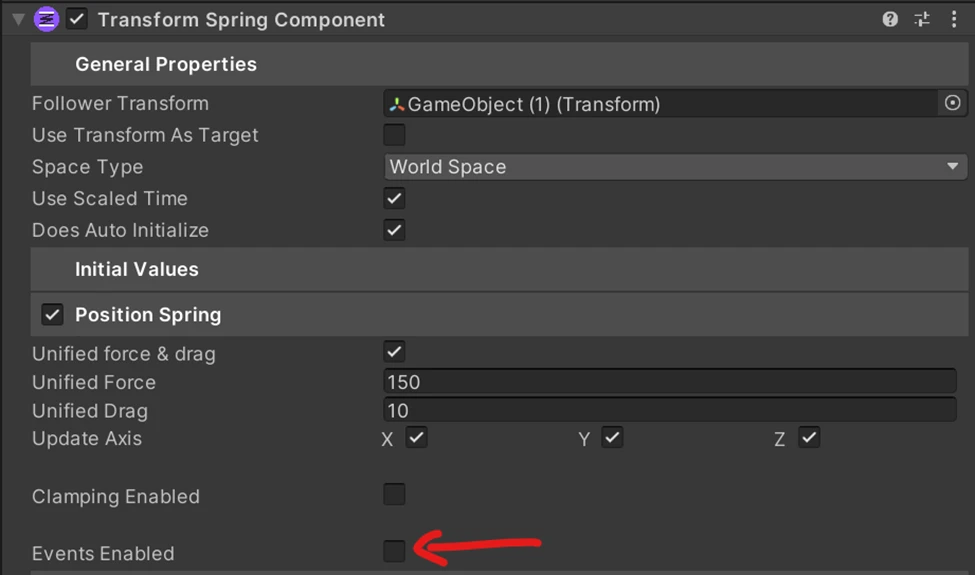
Events are opt-in per spring, so on a TransformSpringComponent you can have them on position and off on scale and rotation.
The three events
Section titled “The three events”OnTargetReached fires when the current value arrives at the target. This is the one you will use most: it replaces checking a distance every frame, and it fires once rather than continuously.
OnClampingApplied fires the moment a value gets clamped. It never fires if clamping is off. Pair it with StopSpringOnClamp and you have a clean “it landed” signal.
OnCurrentValueChanged fires while the spring is actually moving, meaning the velocity is non-zero and the current value is not the target. Useful for anything that should run only during motion, like a sound or a trail.
Subscribing
Section titled “Subscribing”The events hang off a SpringEvents property named after the spring: Events on a single-spring component, PositionEvents and friends where there are several.
using UnityEngine;using AllIn1Assets.AllIn1SpringsToolkit;
public class ChestFeedback : MonoBehaviour{    [SerializeField] private TransformSpringComponent transformSpring;    [SerializeField] private ColorSpringComponent colorSpring;
    private void Awake()    {        transformSpring.PositionEvents.OnTargetReached += PlayLandSound;        transformSpring.PositionEvents.OnClampingApplied += SpawnDust;        colorSpring.Events.OnTargetReached += StopGlow;    }
    private void OnDestroy()    {        transformSpring.PositionEvents.OnTargetReached -= PlayLandSound;        transformSpring.PositionEvents.OnClampingApplied -= SpawnDust;        colorSpring.Events.OnTargetReached -= StopGlow;    }
    private void PlayLandSound() { }    private void SpawnDust() { }    private void StopGlow() { }}
Unsubscribe in OnDestroy. These are plain C# events, so a subscriber that gets destroyed while still subscribed is the usual source of null reference exceptions later.
A working version of this lives in the demo, at Assets\Plugins\AllIn1Assets\AllIn1SpringsToolkit\Demo\Scripts\EventTestExamples.cs.