
Spring Main Elements
The three core values
Section titled “The three core values”Every spring, whatever it drives, holds three numbers:
- Current Value: where the spring is right now, this frame.
- Target: where it is heading. The spring closes the gap a bit at a time rather than jumping.
- Velocity: how fast it is moving. Large when the gap is large, zero when the spring is at rest.

All three are readable and writable at any time, from any script:
Vector3 where = transformSpring.GetCurrentValuePosition();transformSpring.SetTargetPosition(destination);transformSpring.AddVelocityPosition(Vector3.up * 5f);Writing to them is not cheating. Shoving the Current Value or the Velocity is how most of the game feel in this asset gets made, and it has its own page: Nudges and Punches.
Force and Drag
Section titled “Force and Drag”Two settings shape the motion.
Force is how hard the spring pulls towards the target. Raise it and the value gets there sooner, overshoots further, and generally behaves like something lighter and more eager.
Drag is resistance. It fights whatever velocity the spring has, so raising it kills the bouncing and settles the motion down. Lower it and the value swings past the target and back, again and again, before it comes to rest.
A new spring starts at Force 150, Drag 10. That is a good general-purpose feel. From there:
- Snappy UI pop: raise Force, keep Drag around 10 to 20
- Heavy, weighty movement: lower Force, raise Drag
- Loose and wobbly: keep Force, drop Drag towards 2 or 3
Tuning by eye beats reasoning about it. The Spring Debugger lets you change both while the game runs, which is much faster than stopping to edit an Inspector field.
Where each one is set
Section titled “Where each one is set”Force and Drag are normally set once, in the Inspector:
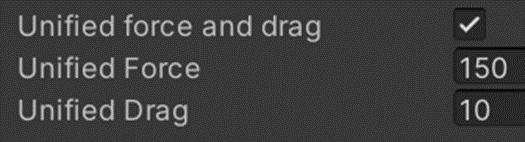
Current Value, Target and Velocity are normally set from code, because they change while the game is running. Nothing enforces that split. You can set Force from a script when a character picks up a heavy object, and you can type a target into the Inspector to see what it looks like.