
Spring Bones
Spring Bones bring the toolkit to character rigs. Instead of springing one object, you spring a chain of transforms: hair, tails, ears, antennae, cloth strips, anything that should lag behind the animation and swing back into place on its own. None of that motion comes from your animation clips, and none of it needs authoring per character.
A skeleton is a tree of bones, each one driven by its own RotationSpringComponent. Every frame the root takes the skeleton’s rotation, passes it down the tree, each bone’s rotation spring lags behind by a different amount, and the results are written back to the transforms.
The bone classes sit in their own namespace, AllIn1Assets.AllIn1SpringsToolkit.Bones.
Setting up a skeleton
Section titled “Setting up a skeleton”- Add a SpringSkeleton component to the object at the top of the chain
- That’s it
Adding the component runs the setup automatically: it finds the root bone, walks the transform hierarchy below it, and creates a SpringBone on every transform it finds, with tuned starting values. You can re-run it at any time with the Redo Configuration button, and Clean removes the whole setup, the bone components included.
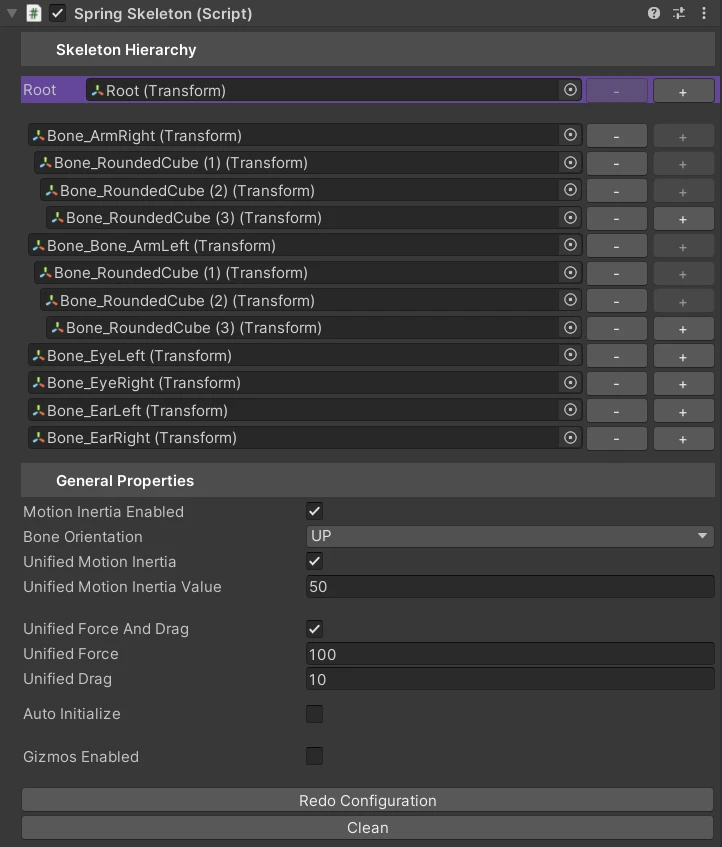
Skeleton Hierarchy
Section titled “Skeleton Hierarchy”The top section is the chain itself. Root is the transform the whole skeleton hangs from, and every row below it is one bone, indented by its depth. Depth matters: it is what the curves below are measured against.
Use + on a row to add a child bone under it and - to remove that bone from the skeleton. If you would rather rebuild the chain from the transforms, change the Root and the hierarchy is recreated from scratch.
General Properties
Section titled “General Properties”| Property | What it does |
|---|---|
| Bone Orientation | Which local axis your bones point down: UP, DOWN, FORWARD, BACK, RIGHT, LEFT. Rigs disagree about this, which is why it is a setting. Getting it wrong makes the bones rotate about the wrong axis, which looks like broken springs rather than a wrong axis |
| Unified Force And Drag | One Force and one Drag for every bone in the chain |
| Unified Force, Unified Drag | Those two values. They mean exactly what they mean on any other spring |
| Motion Inertia Enabled | Turns on the inertia pass described below |
| Unified Motion Inertia, Unified Motion Inertia Value | The same unified-or-curve choice, for inertia |
| Auto Initialize | Initialize the skeleton on Start. Turn it off if you build the character at runtime and want to call Initialize() yourself |
| Gizmos Enabled | Draws the bone chain in the Scene view when the skeleton is selected |
Force and drag along the chain
Section titled “Force and drag along the chain”The interesting part is what happens when you uncheck Unified Force And Drag. Instead of one value for the chain you get a minimum, a maximum, and a curve. The curve is evaluated against each bone’s depth, normalized from 0 at the root to 1 at the deepest bone, and the result blends between the min and the max.
That is how you get a tail that is stiff where it joins the body and floppy at the tip, without touching a single bone by hand. Change the curve’s shape and the falloff changes with it: linear, sharp only at the very end, or stiff throughout with a sudden loose tip.
Unified Motion Inertia works the same way and has its own curve.
Motion inertia
Section titled “Motion inertia”Rotation alone is not enough. A character that runs forward in a straight line never rotates, so hair driven purely by rotation springs would not move at all.
Motion inertia fixes that. Each bone measures how far it travelled between frames and converts that translation into extra rotation, scaled by the inertia value for its depth. Now running forwards swings the hair back, stopping makes it swing through, and none of it came from the animation. Tips react more than roots, because the inertia curve is depth-normalized just like force and drag.
Attachable bones
Section titled “Attachable bones”SpringBoneAttachable is a bone that also keeps its position pinned to a point on its parent, instead of just inheriting rotation. Use it for something hanging off the chain, like an accessory on the end of a rope, where the rotation spring alone would let it drift away from its attachment point.
Add it to a bone and it brings its own RotationSpringComponent along, so there is nothing else to wire up.
Driving the skeleton from code
Section titled “Driving the skeleton from code”springSkeleton.Initialize(); // only needed if Auto Initialize is offspringSkeleton.SetForce(150f); // whole chainspringSkeleton.SetDrag(12f);springSkeleton.SetSkeletonEnabled(false); // stop the chain and zero its velocitiesDisabling the skeleton zeroes every velocity as it stops, so re-enabling it does not release a frame’s worth of stored-up motion as a snap.
Things worth knowing
Section titled “Things worth knowing”- Let the setup build the chain. Bone depth is what every curve is measured against, and it is computed during setup. A hand-wired skeleton whose depth was never computed will feed nonsense into the curves.
- Bone Orientation must match the rig. It is the first thing to check when a chain moves in a way that makes no sense.
- Long chains cost. Each bone is one rotation spring plus three traversals of the tree per frame. That is cheap for a few characters with a tail each, and worth profiling for a crowd of them.