
Motion Effects and Tags
The twelve effects the Typewriter plays on each letter or word, and the tags that put them on chosen words inside a text.

Which effects go where
Section titled “Which effects go where”- Reveal and Hide use the four effects that run from one value to another: Fade, Scale, Initial Rotation and Offset.

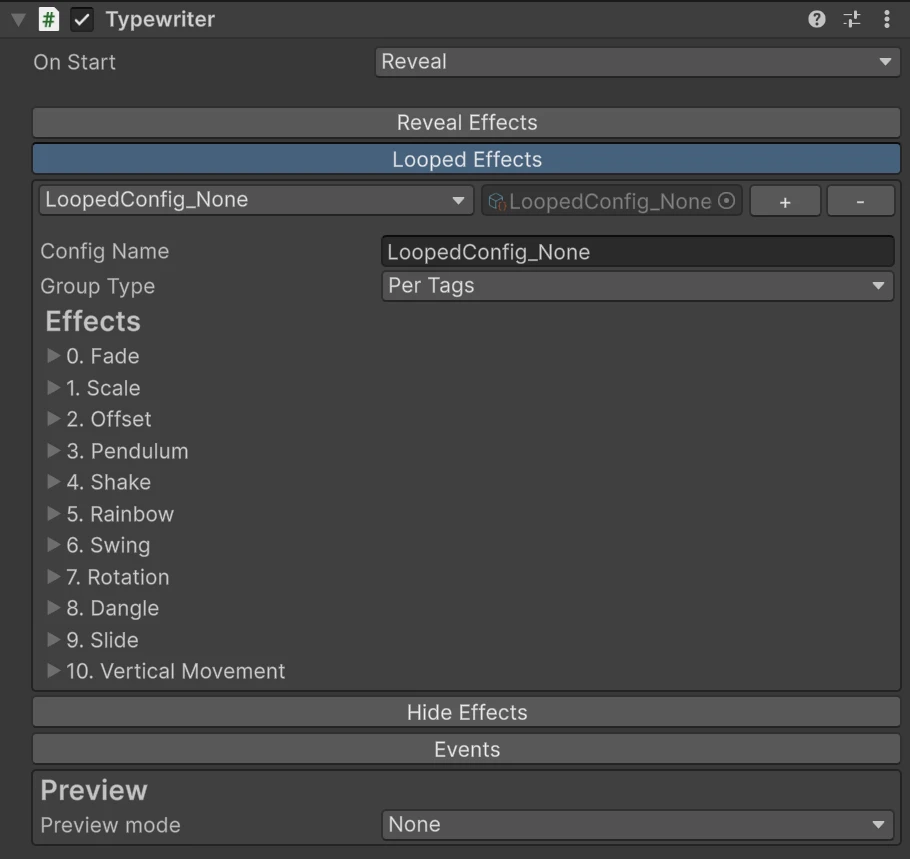
- Looped uses eleven: Fade, Scale, Offset, Pendulum, Shake, Rainbow, Swing, Rotation, Dangle, Slide and Vertical Movement.

Each one on its own, with some values larger than the defaults so the motion shows at this size:
The effects
Section titled “The effects”Distances are in the text’s local units, so pixels for UI text. Angles are in degrees.
| Effect | Settings (tag name, default) | What it does |
|---|---|---|
| Fade | From (from, 0), To (to, 1), Speed (speed, 2) | Fades the letter’s opacity from From to To |
| Scale | From (from, [0,0]), To (to, [1,1]), Speed (speed, 0.5) | Scales the letter around its center, X along its baseline and Y across it, so you can squash and stretch |
| Initial Rotation | From (from, 45), To (to, 0), Speed (speed, 2) | Turns the letter from one angle to another. Reveal and hide only |
| Offset | From (from, [0,15]), To (to, [0,0]), Speed (speed, 1) | Moves the letter from one position to another |
| Pendulum | From (from, -30), To (to, 30), Speed (speed, 0.5) | Swings the letter like a sign hanging from its top |
| Shake | Speed (speed, 20), Length (length, 5) | Jitters the letter at random. Speed is how many times per second it jumps |
| Rainbow | Speed (speed, 20) | Cycles the letter through twelve rainbow colors, keeping its opacity |
| Swing | Amount (amount, 30), Speed (speed, 5) | Rocks the letter from side to side around its center, up to Amount degrees |
| Rotation | Speed (speed, 5) | Spins the letter around its center without stopping, Speed × 100 degrees per second |
| Dangle | Length (length, 20), Speed (speed, 2) | Swings the bottom of the letter sideways while its top stays put, like something hanging |
| Slide | Length (length, 10), Speed (speed, 2.5) | Leans the letter back and forth like a wobbling italic |
| Vertical Movement | Height (height, 15), Speed (speed, 2) | Bounces the letter up and down by Height |
Speed in Fade, Scale, Initial Rotation, Offset, Pendulum, Swing, Dangle, Slide and Vertical Movement is how many runs or cycles happen per second: at 2, one run takes half a second.
Ease Function shapes each run, see Eases. Shake, Rainbow and Rotation have no ease, and Slide always uses a smooth one of its own, so their Ease Function changes nothing.
Effects stack in list order. An Initial Rotation and an Offset together turn the letter while it flies in, and Scale keeps its squash along the letter’s own axes after it turns.
Two of these share a name with a material effect but are not the same thing: the typewriter’s Fade and Shake move or fade each letter with timing, while the material’s Fade and Vertex Shake run all the time on the graphics card. See Effects and Properties.

Tags put a looped effect on chosen words, like rich text:
<shake;speed:30;length:3>Danger</> ahead: <rainbow>loot</> and a <verticalMovement;height:10;speed:1.5;ease:bounce_01_looped>jump</>!Each tagged part moves as one piece while the rest of the text stays still. Tags drive loops only, so a tagged word can still be revealed and hidden letter by letter like the rest.
One tag per effect, each text as written above what it does:
Setting it up
Section titled “Setting it up”- Press + in the typewriter’s Looped Effects to make an editable preset.
- Set its Group Type to Per Tags.
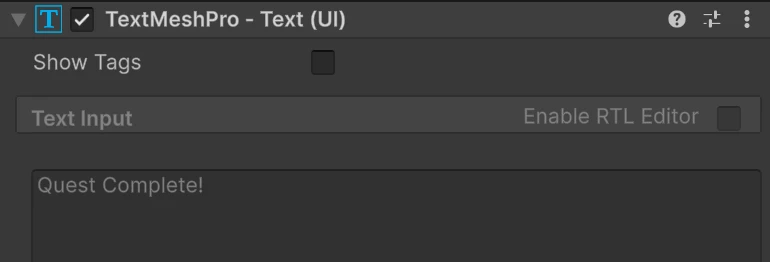
- Tick Show Tags at the top of the text’s TextMeshPro inspector and write the tags into the text.
While Show Tags is off, the text box shows the text without tags and is locked, so turn it on to edit. The tags are stripped from what is shown in play mode.
The rules
Section titled “The rules”- A tag is
<effect>, then the text, then</>. The closing tag is always</>. - Settings follow the effect’s name, each after a
;, written asname:value:<shake;speed:30>. - Effect names are the tag names in the table above, such as
verticalMovement. They ignore case. Setting names do not:speed, notSpeed. - Numbers use a point for decimals:
1.5, never1,5. - Two numbers go in brackets with no spaces:
from:[0,20]. A single number also works: for Scale it sets both axes,to:1.5, and for Offset it moves vertically, soto:5is[0,5]. ease:takes one of the looped eases:linear_looped,bounce_01_loopedorwave_01_looped, the default.- No spaces and no
=inside a tag, or it is not recognized and shows up in the text as typed. - Tags do not nest, and a tagged part cannot contain TextMeshPro tags such as
<b>. Put those around the tag instead:<b><shake>BOOM</></b>. - Anything a tag leaves out takes the default in the table above, so
<shake>and<rainbow>work on their own.
A tag with an unknown effect, or a setting whose value cannot be read, is skipped with a warning in the Console that names it.
Building a tag
Section titled “Building a tag”With Group Type set to Per Tags, the Looped Effects section lists every effect with its settings and a Copy Tag button. Set the values there and press it to copy a ready tag to the clipboard, then paste it around your words. The values only reach the text through the tag: what the tag leaves out comes from the table above.
Tags from code
Section titled “Tags from code”Pass the tags to SetText(), which reads them and regroups the letters:
typewriter.SetText("You found <rainbow>a legendary sword</>!");