
Floating Damage Numbers in Unity with TextMeshPro
A damage number is a short text spawned where the hit landed, pushed a little to one side so numbers do not pile up, then moved up and faded out in under a second. With a few hits a second it also needs a pool: a handful of texts made once and reused, instead of a new object for every hit.
Damage numbers by hand
Section titled “Damage numbers by hand”For numbers in the game world, use a TextMeshPro (the 3D one, not the UI one) as the prefab, with the font size small and the alignment centred. This script keeps a pool of them, shows a number at a position, and moves each one up and out:
using System.Collections.Generic;using TMPro;using UnityEngine;
public class DamageNumbers : MonoBehaviour{    private class Popup    {        public TextMeshPro text;        public Vector3 from;        public float time;    }
    [SerializeField] private TextMeshPro prefab;    [SerializeField] private int poolSize = 20;    [SerializeField] private float life = 0.8f;    [SerializeField] private float rise = 1.2f;    [SerializeField] private float spread = 0.4f;
    private readonly Queue<TextMeshPro> pool = new Queue<TextMeshPro>();    private readonly List<Popup> active = new List<Popup>();    private Transform cam;
    private void Awake()    {        cam = Camera.main.transform;        for (int i = 0; i < poolSize; i++)        {            TextMeshPro text = Instantiate(prefab, transform);            text.gameObject.SetActive(false);            pool.Enqueue(text);        }    }
    public void Show(Vector3 position, int amount, bool critical = false)    {        if (pool.Count == 0) Recycle(active[0]);
        TextMeshPro text = pool.Dequeue();        text.text = critical ? $"<size=150%>{amount}!</size>" : amount.ToString();        text.color = critical ? new Color(1f, 0.8f, 0.2f) : Color.white;        text.gameObject.SetActive(true);
        Vector3 jitter = new Vector3(Random.Range(-spread, spread), Random.Range(0f, spread * 0.5f), 0f);        active.Add(new Popup { text = text, from = position + jitter });    }
    private void Update()    {        for (int i = active.Count - 1; i >= 0; i--)        {            Popup p = active[i];            p.time += Time.deltaTime;            float t = p.time / life;            if (t >= 1f) { Recycle(p); continue; }
            float eased = 1f - (1f - t) * (1f - t) * (1f - t);            p.text.transform.SetPositionAndRotation(p.from + Vector3.up * rise * eased, cam.rotation);            p.text.alpha = 1f - t * t;        }    }
    private void Recycle(Popup p)    {        p.text.gameObject.SetActive(false);        active.Remove(p);        pool.Enqueue(p.text);    }}
Call damageNumbers.Show(enemy.position + Vector3.up, 42) from wherever damage is dealt. Four details do most of the work:
- The random offset, so a burst of hits fans out instead of stacking on one spot.
- An eased rise, fast at first and slowing, which reads as a pop rather than a lift.
- Facing the camera: copying the camera’s rotation keeps the numbers flat to the screen in 3D.
- The pool, which reuses the oldest number when every one is in use, so a long fight never creates or destroys an object.
On a canvas instead. For numbers in the UI, use TextMeshPro - Text (UI) under a canvas and move them with RectTransform.anchoredPosition; convert the hit’s world position with Camera.WorldToScreenPoint first. The rest is the same.
When they do not show
Section titled “When they do not show”- Behind the enemy. A 3D TextMeshPro sorts like a sprite: raise its renderer’s Sorting Layer or Order in Layer (
text.sortingOrder) above the characters’. - On a World Space canvas the canvas needs a scale small enough to fit the scene. A new one is sized in pixels, so at a scale of 1 it is hundreds of units wide and its texts are far off screen; 0.01 is a usual start.
- The value is wrong. Set the text after taking it from the pool, as
Showdoes, not on the prefab before it is made. - Numbers flicker as they overlap. Several texts at the same depth sort arbitrarily; give each new one an Order in Layer one higher than the last.
With All In 1 Text Toolkit
Section titled “With All In 1 Text Toolkit”Don’t own it yet? → Get it on the Unity Asset Store
The clip at the top of this page is the demo scene’s Combat Text showcase, number 17 on Demo Scene, exactly as it plays. Open the demo and step to it: everything below is in its Damage object and in Demo/Scripts/Showcases/DemoCombat.cs, ready to take apart and copy.
How the demo’s Combat Text works
Section titled “How the demo’s Combat Text works”Every number is a text made in advance. The showcase holds all the texts it will ever show from the start, hidden: four for hits and two for each other kind. Each is a TextMeshPro UI text with the All In 1 Text Shader component and a Typewriter, and each has its own material. Nothing is created or destroyed while it plays: a new hit takes the next text of its kind and plays it again.
Seven kinds, each with its own look and motion. DemoCombat lists them as kinds. A kind holds the texts it can show, its pool, where it spawns, how far it rises and drifts, how long it lives, how big it starts, and what it does to the target:
| Kind | Shows | Look | Typewriter | Motion | Target |
|---|---|---|---|---|---|
| Hit | -38 to -63 | Bangers, red: Color Gradient, Extrude, Outline, Outer Glow | Reveal_PopHit, Hide_Poof | rises 120, drifts 30, lives 1 s, starts at 1.5 times its size | loses a tenth of its health, squashes |
| Critical | -864, -999, -1337 | Bangers, the same effects with an orange glow | Reveal_PopCrit, Loop_CritShake, Hide_Poof | rises 90, lives 1.5 s, starts at 2.2 times | loses over a third, squashes harder and shakes |
| CRITICAL! | CRITICAL! | as the critical | Reveal_PopCrit, Hide_Poof | spawns with the critical, above it | |
| Heal | +95 to +140 | Lilita One, green: the hit’s effects in green | Reveal_PopHit, Loop_HealBob, Hide_Poof | rises 100, lives 1.3 s | gets back over a third, stretches |
| Miss | MISS, DODGE! | Lilita One, grey: Color Gradient and Extrude only | Reveal_PopHit, Hide_Poof | drifts 60 to the side | steps out of the way |
| XP | +25 XP, +40 XP | Lilita One, blue | Reveal_PopHit, Hide_Poof | rises 140, off to the left | |
| Gold | +50 G, +120 G | Lilita One, gold: Bevel with Specular, Drop Shadow, Outline, Extrude, Color Gradient | Reveal_PopHit, Hide_Poof | rises 140, off to the right |
Distances are in the canvas’s units. The materials are in Demo/Showcases/Materials, MAT_Demo_Damage_Hit0 to MAT_Demo_Damage_Gold1: the texts of one kind have the same settings, each on its own material.
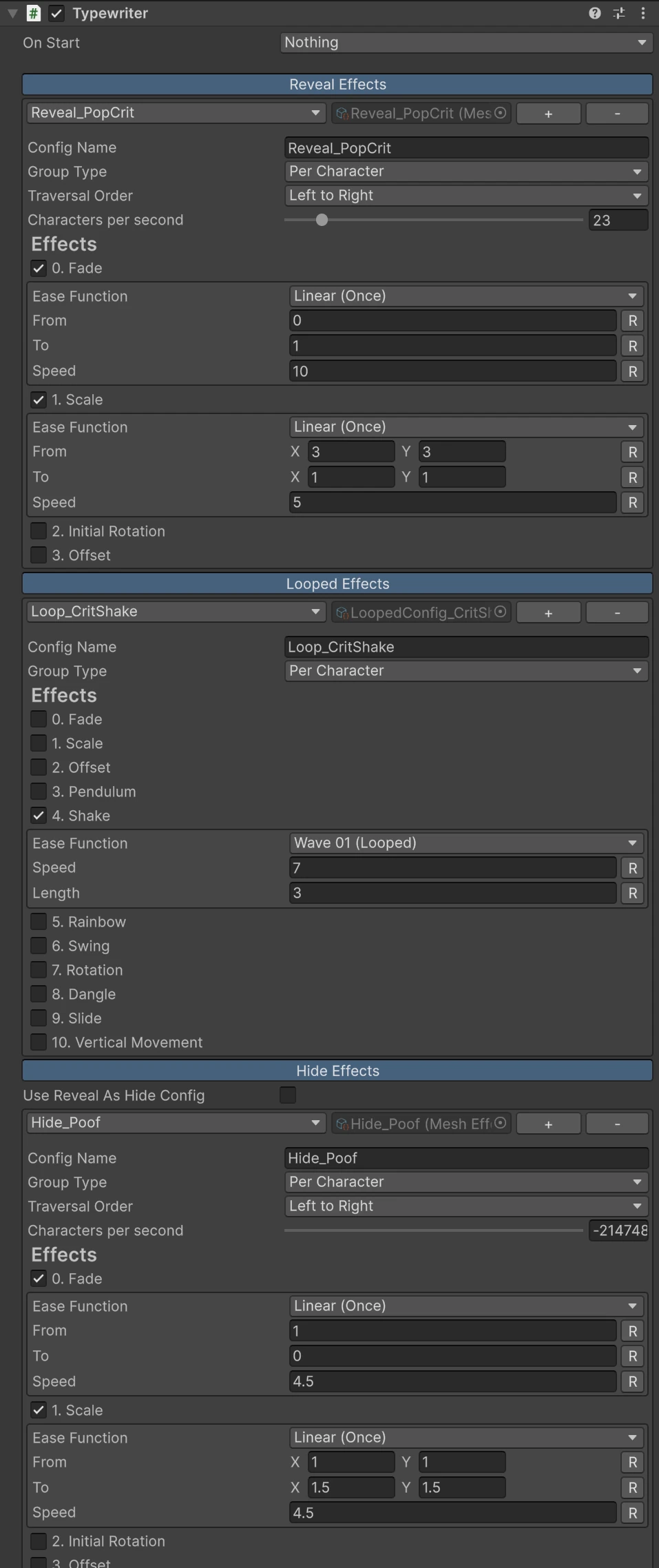
The pop is the Typewriter. On every pooled text On Start is Nothing, so it waits hidden until it is called. Its three configs do the rest:
- Reveal: Reveal_PopCrit fades each letter in while it shrinks from three times its size, 23 letters a second; Reveal_PopHit does the same for the smaller numbers.
- Looped: Loop_CritShake shakes the letters of a critical for as long as it is up; Loop_HealBob bobs a heal up and down.
- Hide: Hide_Poof fades every letter out while it grows to one and a half times its size.
Spawning one. Spawn takes the kind’s next text in turn, the oldest, gives it one of the kind’s texts with SetText(), then calls Reveal(). Both calls matter on a pooled text: a typewriter stopped by HideImmediate() only arms its reveal on SetText(). It places the text at the spawn point plus the kind’s offset plus a random jitter of up to the kind’s spread to either side, and sets its scale to the kind’s punch.
Every frame. Each live number rises along an ease out curve, 1 - (1 - t)³, so it shoots up and slows; it drifts sideways in a straight line; and its punch scale falls back to normal within a fraction of a second. 0.3 seconds before its life ends it calls Hide(), and once the hide has played it is free for the next hit.
The target. Each kind tells the monster how to react: a hit squashes it, a critical squashes it harder and shakes it from side to side, a heal stretches it, a miss slides it out of the way and back. A silhouette over it flashes white for a fraction of a second, green for a heal. The health bar drops at once, and a second bar behind it drains after it a moment later.
The timing is a list of beats, a kind and a time, over a 6.6 second loop. In a game, the spawn is called from wherever damage is dealt instead.
Doing it in your game
Section titled “Doing it in your game”Copy what fits from the Damage object: its texts with their materials and their Typewriters, one set per kind of number. The code that plays one pooled text is short:
using AllIn1Assets.AllIn1TextShader;using UnityEngine;
public class ToolkitDamageNumber : MonoBehaviour{    [SerializeField] private AllIn1TextTypewriter typewriter;
    public void Play(int amount, bool critical)    {        typewriter.SetText(critical ? $"{amount}!" : amount.ToString());        typewriter.Reveal();    }
    public void End() => typewriter.Hide();
    public bool IsDone() => typewriter.IsHidden();}
Move the text up as the demo does, call End() about 0.3 seconds before its life is over, and return it to the pool once IsDone(): it is false while the number shows and true once the hide has played, 0.7 seconds after End() on the demo’s critical. Use the Looped config for anything a kind always does, as the demo’s criticals shake and its heals bob; tags are for one word inside a text (Motion Effects and Tags). The typewriter’s calls are on Scripting.
Particles from the letters, for a big hit, are on Text Particles.
How many at once
Section titled “How many at once”Numbers that share one material batch, as TextMeshPro texts do (since version 1.1), so give every number of a kind the same saved material. A text with a playing typewriter is rewritten every frame, so the cost grows with how many animate at once. Twenty numbers on screen cost nothing worth measuring. See Draw calls and The CPU side.
What it does not do
Section titled “What it does not do”- Spawn the numbers for you. The toolkit styles and animates a text; the pool and the spawning are your script, or the demo’s to copy.